Skip to content

Halloween event: 65% off

  • Fivem - PAUSE MENU & MINIMAP V System

🌟 Karma Developments - Pause Menu V | Advanced FiveM Pause Menu System 🌟


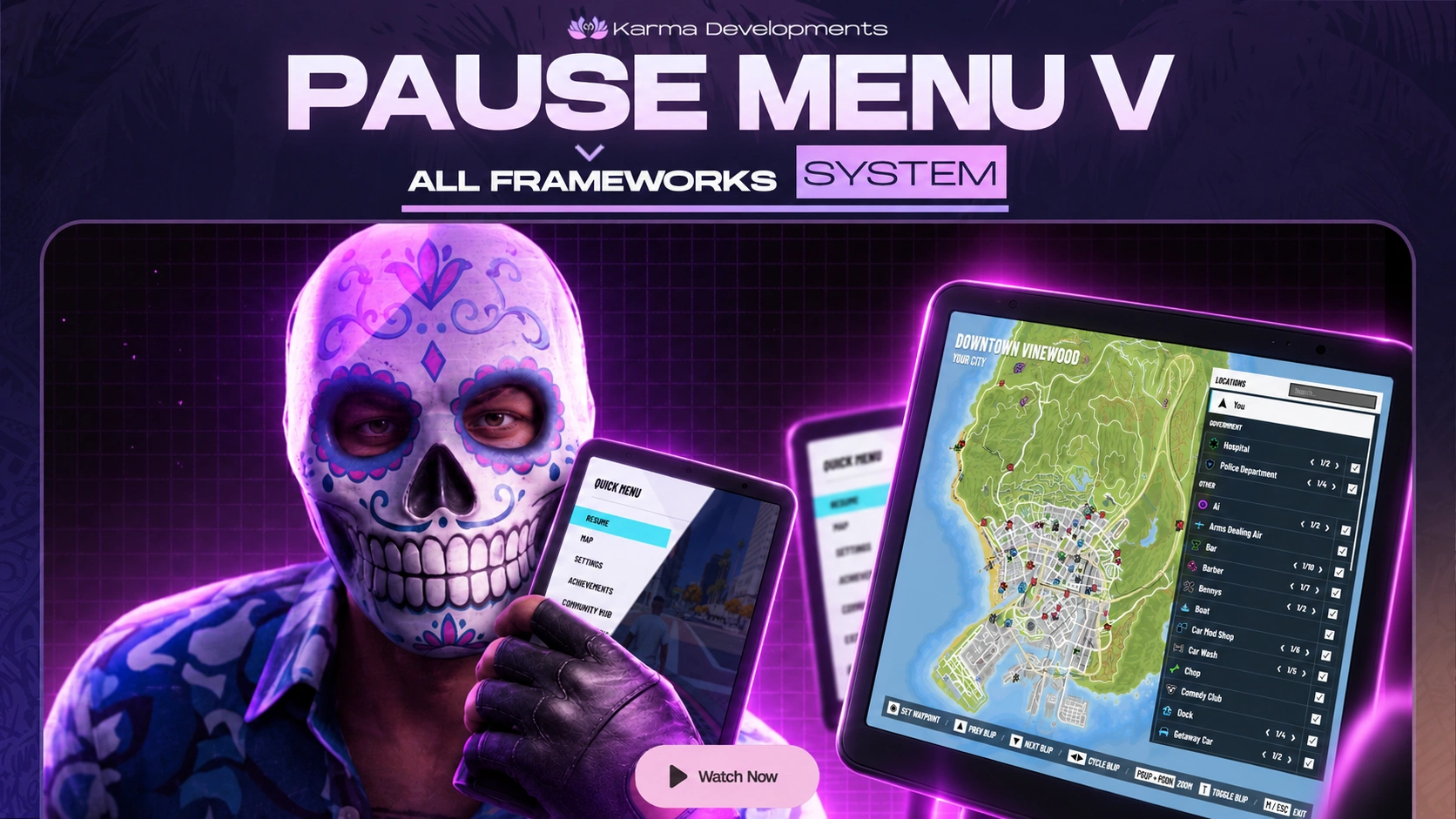
🎉 Introducing Pause Menu V, a modern and fully configurable FiveM pause menu replacement designed to give your server a polished, responsive, and immersive menu experience without locking you into a specific framework.

Built to work across ESX, QBCore, Qbox, custom frameworks, and standalone servers, Pause Menu V replaces the standard pause-menu flow with a custom Quick Menu, an interactive world map, player settings, custom key bindings, achievements, community information, legal information, and direct access to native GTA/FiveM settings. 🗺️⚙️✨

The resource is client-side and does not require SQL, ox_lib, oxmysql, or a framework dependency.


✅ Framework Independent

Pause Menu V does not rely on QBCore, Qbox, ESX, or another framework API. Drop it into your resources, configure your server information, and use it across virtually any FiveM setup.

🎥 Preview Video


📦 Features

  • Modern Custom Pause Menu UI 🎨
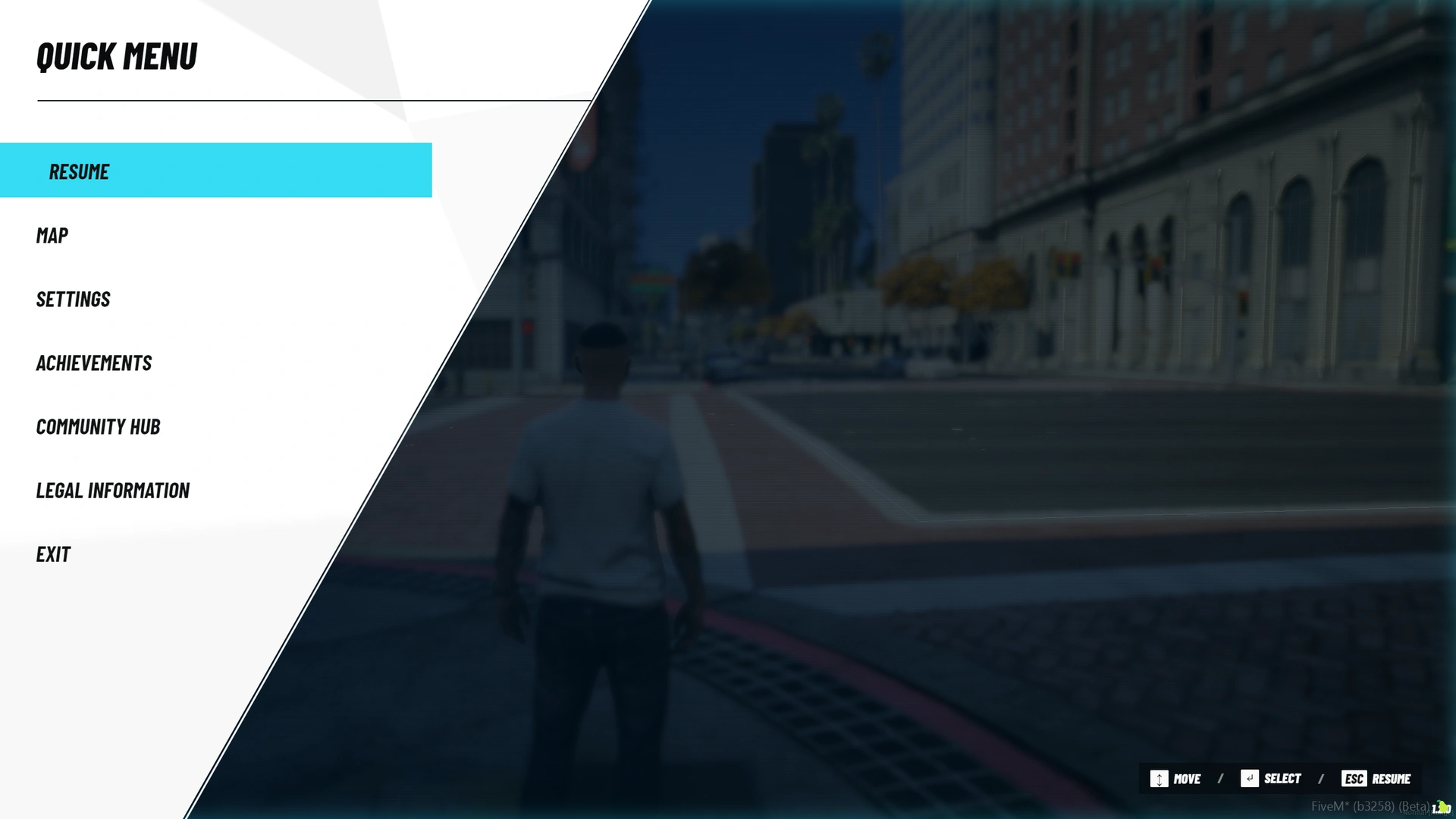
    Replaces the normal pause-menu flow with a clean, responsive Quick Menu featuring Resume, Map, Settings, Achievements, Community Hub, Legal Information, and Exit.
  • Interactive Custom World Map 🗺️
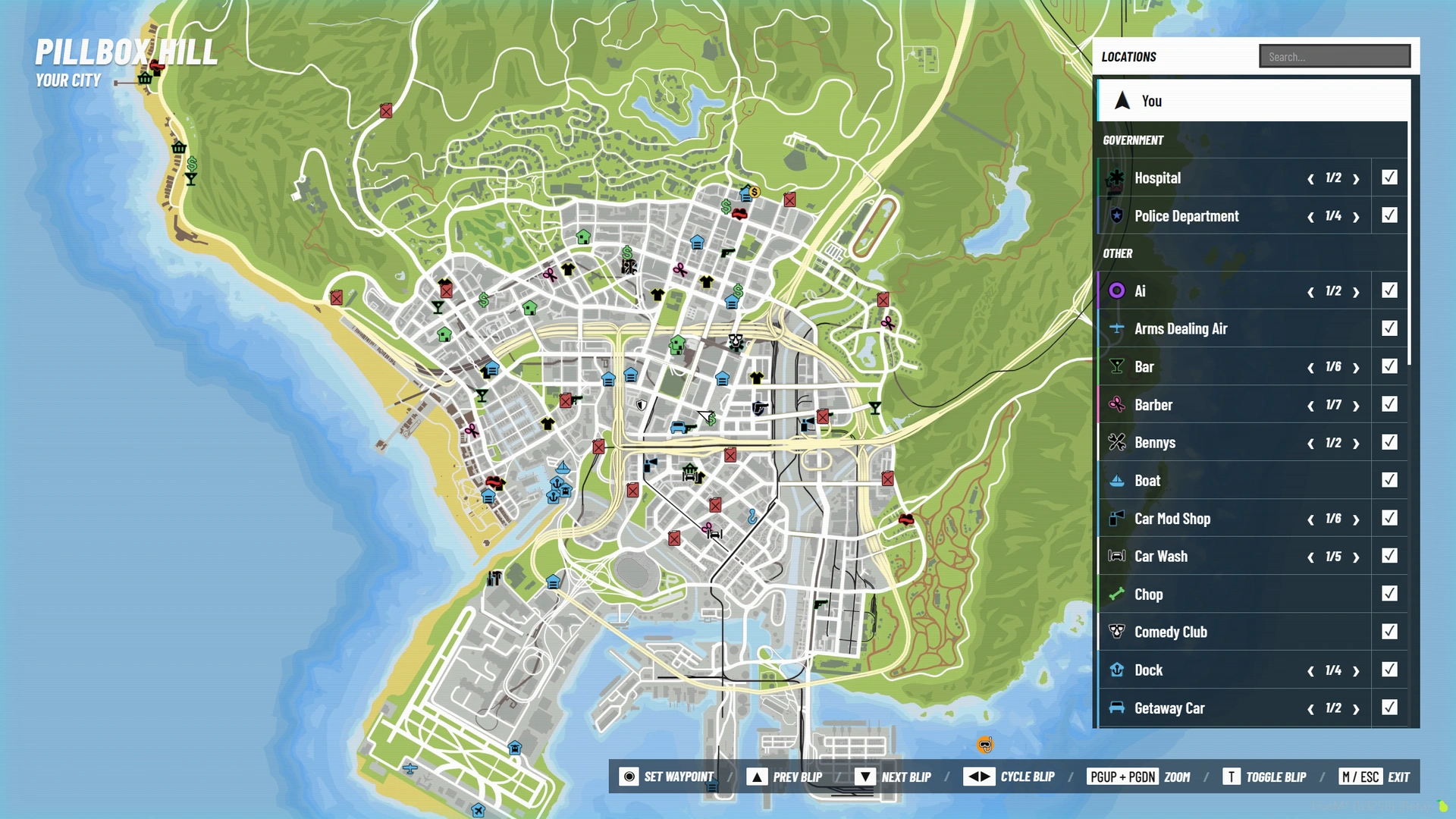
    Includes a full-screen map with live player position, heading, zooming, panning, waypoint management, location search, grouped blips, and an organized sidebar inspired by a premium in-game map experience.
  • Automatic Existing Blip Detection 📍
    Pause Menu V scans the blips already created by your server and displays supported visible blips on the custom map. Existing in-game position, color, and opacity are used automatically, so you do not need to rebuild every location specifically for the pause menu.
  • Searchable Location Sidebar 🔎
    Players can search map locations, browse categories, center the map on a location, cycle through multiple blips of the same type, and temporarily toggle location groups on or off inside the menu.
  • Waypoint Management 🧭
    Set a waypoint directly from the custom map, double-click/right-click map positions, select listed locations, clear the current waypoint, or jump back to the player's current position.
  • Native GTA Map Access 🎮
    Players can open the original GTA/FiveM map directly from Pause Menu V whenever they want native map functionality.
  • Advanced Settings Interface ⚙️
    Includes configurable Pause Menu V settings for background blur, screen texture, menu sound volume, HUD, radar, reticle, on-foot camera, and vehicle camera.
  • Native GTA / FiveM Settings Integration 🖥️
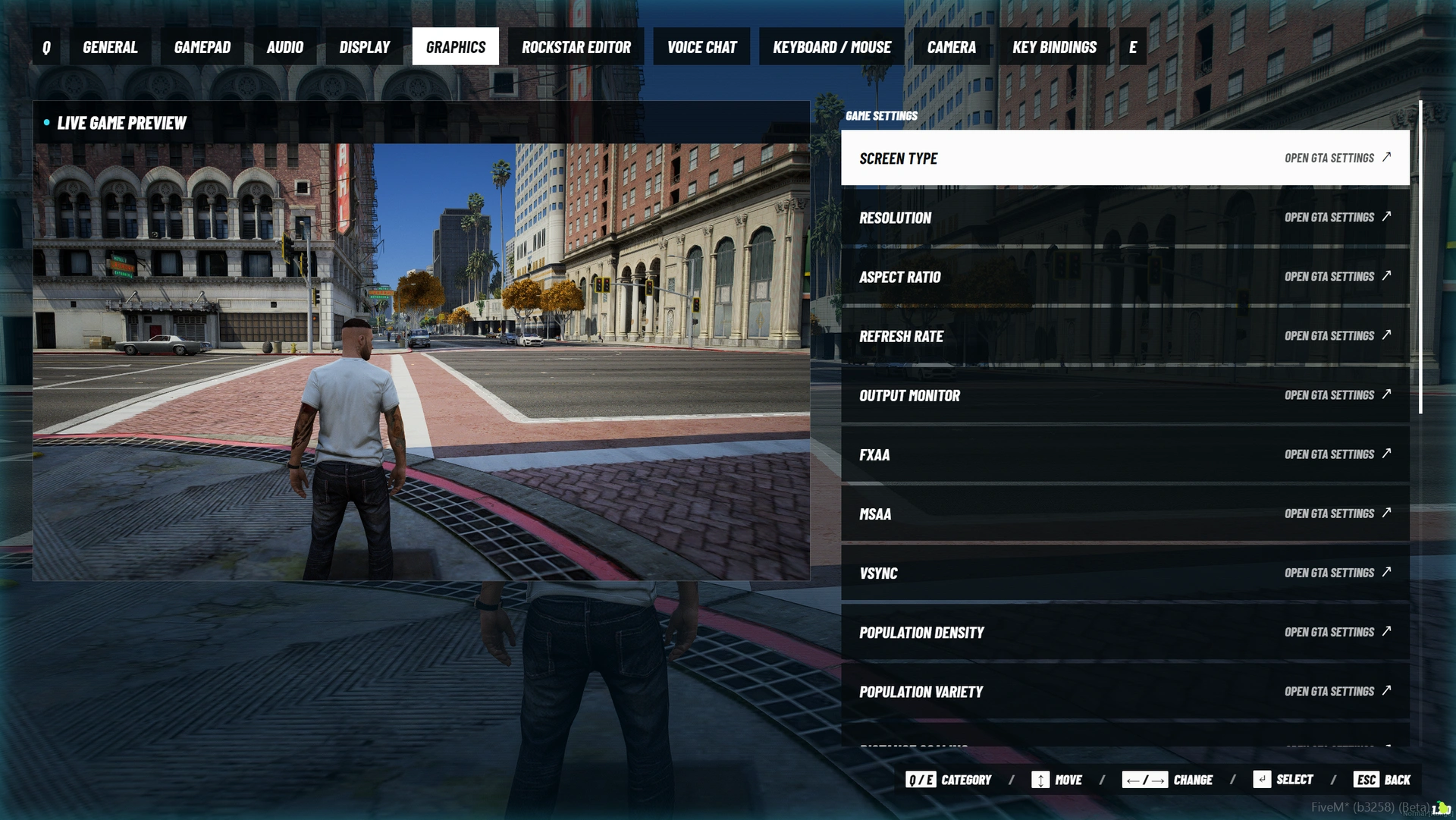
    The interface links directly into native game settings instead of pretending to control options that belong to GTA. Players can access categories such as General, Gamepad, Audio, Display, Graphics, Rockstar Editor, Voice Chat, Keyboard / Mouse, Camera, and Key Bindings.
  • Live Graphics Preview 🖼️
    The Graphics section includes a live in-game preview when supported by the player's FiveM client, helping players adjust visual options without losing the menu experience.
  • Custom Key Binding Editor ⌨️
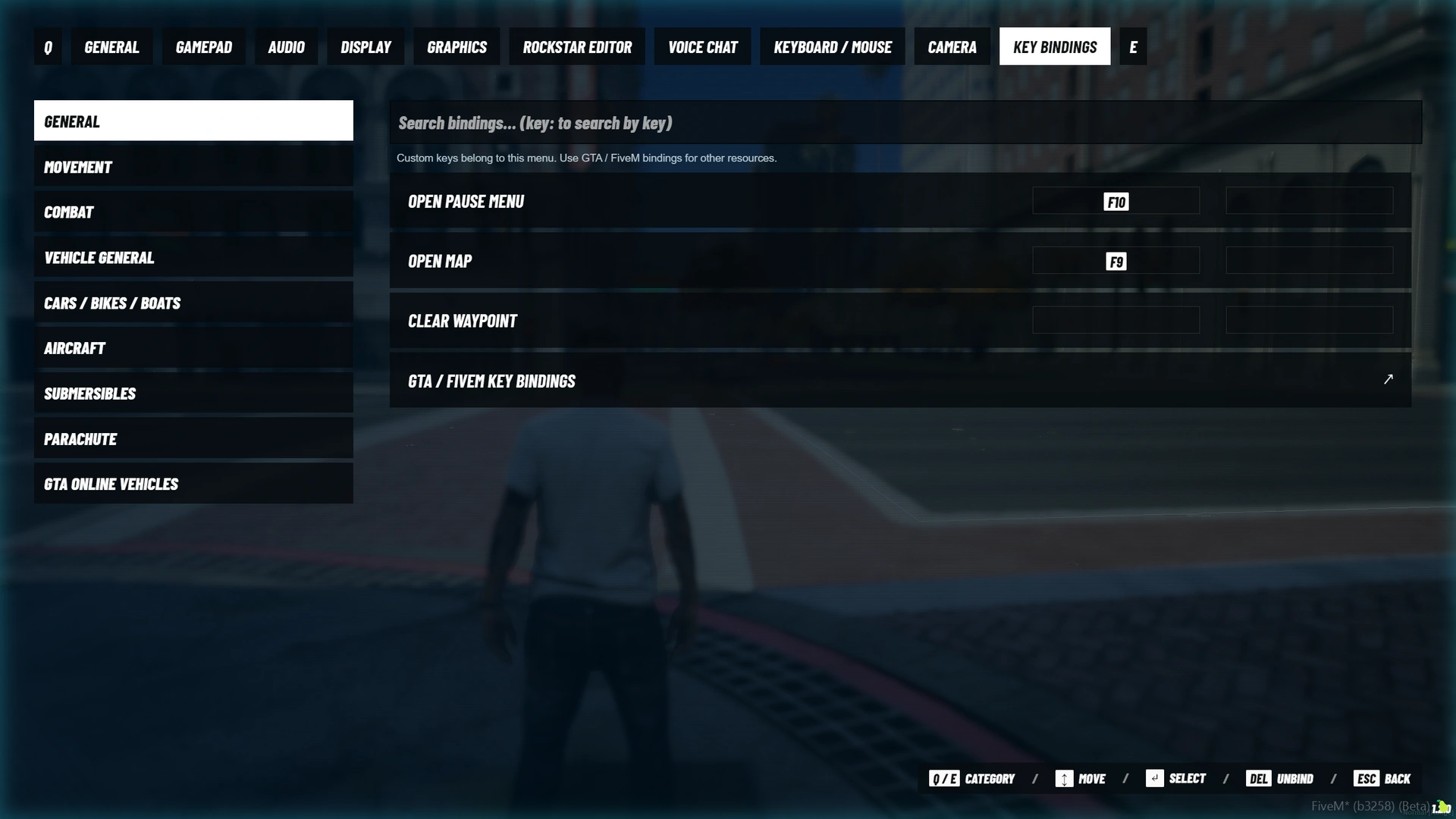
    Pause Menu V includes editable bindings for its own actions, two binding slots per custom action, key-conflict detection, key search, and persistent per-player saves.
  • ESC Pause Menu Replacement 🔁
    Pressing ESC routes the player into Pause Menu V while the resource is active, with safe handling to prevent the native pause menu from opening underneath it.
  • Configurable Achievements 🏆
    Add server achievements with a title, description, and unlocked state directly from the configuration.
  • Community Hub 💬
    Display server information, announcements, community text, and an optional secure https:// community link from inside the pause menu.
  • Legal / Server Information Page 📜
    Add your own server rules, disclaimers, community information, or legal text directly through the configuration.
  • Custom Server Branding 🎨
    Configure the menu title, server/city name, accent color, community title, community text, legal text, command, version display, blur, scanlines, and more.
  • Karma HUD V Integration 🧩
    Built-in optional support for karma-hud-v automatically hides the HUD while Pause Menu V is open and restores it when the menu closes. Servers using another HUD can disable this or integrate through the included events.
  • Developer Exports & Events 🔌
    Includes client exports to open, close, check menu state, register blips, and unregister blips, plus events for menu visibility and setting changes.
  • Custom Blip Labels & Categories 🏷️
    Define readable names/categories by sprite ID or register individual blips from another resource when multiple locations need unique names.
  • Persistent Player Preferences 💾
    Pause Menu V saves its custom settings and key bindings through FiveM resource KVP storage, keeping player preferences available between sessions.
  • No Database Setup 🗃️
    No SQL import is required. Pause Menu V does not need a database to function.
  • No Framework Dependency 🔗
    Works without framework exports or framework-specific initialization, making it suitable for ESX, QBCore, Qbox, standalone, and custom-framework servers.
  • Fully Configurable Source ⚙️
    The package contains readable Lua configuration/client files plus the NUI HTML, CSS, JavaScript, included map tiles, fonts, and a large blip-icon asset library for extensive customization.


🛠️ Requirements & Dependencies

Pause Menu V is designed to be simple to install.

Required:

  • FiveM server
  • karma-pausemenu

Framework requirement:

  • None

Database requirement:

  • None

Optional integration:

  • karma-hud-v — used only if you want Pause Menu V to automatically call the Karma HUD V hideHUD / showHUD exports while the menu is open


If you do not use Karma HUD V, simply set:

Config.HudResource = ''


🎮 Default Controls

  • ESC — Open Pause Menu V / return / resume
  • F10 — Open Pause Menu V
  • F9 — Open the custom map
  • Arrow Keys — Navigate menu/map selections
  • Enter — Select / set waypoint
  • Page Up / Page Down — Map zoom
  • T — Toggle selected map blip group
  • Delete — Clear waypoint / unbind selected custom key where applicable
  • W A S D — Pan the custom map
  • F6 — Open native GTA map from the custom map

Custom Pause Menu V bindings can be edited in-game by the player.


🗺️ Map Integration

Pause Menu V reads supported visible blips already present in the game world.

For common sprite IDs, you can provide clean display names and categories in Config.BlipStyles:

Config.BlipStyles = {
[60] = { label = 'Police Department', category = 'GOVERNMENT' },
[61] = { label = 'Hospital', category = 'GOVERNMENT' },
[52] = { label = 'Store', category = 'SHOPS' },
}

For a specific blip created by another resource:

exports['karma-pausemenu']:RegisterBlip(blip, {
label = 'Legion Garage',
category = 'GARAGES'
})

🔌 Developer Integration

Client exports include:

exports['karma-pausemenu']:Open()
exports['karma-pausemenu']:Open('map')
exports['karma-pausemenu']:Close()
exports['karma-pausemenu']:IsOpen()
exports['karma-pausemenu']:RegisterBlip(blip, data)
exports['karma-pausemenu']:UnregisterBlip(blip)

Integration events include:

karma-pausemenu:visibility
karma-pausemenu:settingChanged

These make it easy to connect custom HUDs, gameplay systems, or other client resources to the menu state and player preferences.


📂 Included Resource

The package contains:

karma-pausemenu — Main Pause Menu V client resource, custom NUI, interactive map, settings system, map assets, blip assets, and configuration.

A customer README is included with installation, configuration, controls, integrations, exports, events, map setup, and troubleshooting information.


🔓 Customization

Pause Menu V can be configured for your server without requiring a specific framework.

Customize items such as:

  • Menu title
  • Server/city name
  • Accent color
  • Open command
  • Default bindings
  • Blur and screen texture
  • Community Hub title/text/link
  • Legal information
  • Achievements
  • Blip labels and categories
  • Map behavior
  • Extra menu settings
  • HUD integration
  • NUI styling and frontend assets


⚠️ Purchase Notice

Please review the product details and compatibility information before purchasing.

Pause Menu V is a digital FiveM product. Karma Developments' current store policy states that digital-product sales are final once access has been granted. If you experience an installation or configuration problem, please contact the official support team for assistance.

Karma Developments advertises instant delivery, lifetime free updates, and 24/7 support for its scripts through the official store and support channels.


❗️ Important: Once you've completed your purchase, please open a purchase/support ticket with your Invoice ID and CFX/Keymaster username so the team can identify your order and assist you efficiently.


🛒 Explore the Karma Developments catalogue:
https://karmadevelopments.shop/catalogue

💬 Join the official Discord for support and updates:
https://discord.gg/karmadevelopments

📜 Terms of Service:
https://karmadevelopments.shop/terms-of-service

↩️ Refund Policy:
https://karmadevelopments.shop/refund-policy


Bring a cleaner, faster, and more immersive navigation experience to your FiveM server with Karma Developments — Pause Menu V. 🗺️🎮✨

Please check the latest change-log in our discord

Automatic feedback after 7 days.
Bought Fivem - PAUSE MENU & MINIMAP V System (Escrowed)

Automatic feedback after 7 days.

Bought Fivem - PAUSE MENU & MINIMAP V System (Escrowed) and 2 more

Automatic feedback after 7 days.

Bought Fivem - PAUSE MENU & MINIMAP V System (Escrowed)

nice
Bought Fivem - HUD V System (Escrowed) and 1 more
Read all reviews

Fivem - PAUSE MENU & MINIMAP V System

€8.90

Buy

Pairs well with this

Other resources owners add alongside it.